PROGRADE AEROSPACE
HUD-Sim
Interactive HUD, PFD, and visual-attitude familiarisation for pilot training - on iPad.
Developed from firsthand experience within an advanced pilot training environment, HUD Sim is already used in a Defence pilot-training program. The underlying framework is aircraft-agnostic and can be adapted to suit different aircraft types, as well as civil flight-training organisations or other contexts where instrument interpretation and visual-attitude awareness are key learning outcomes.
OVERVIEW
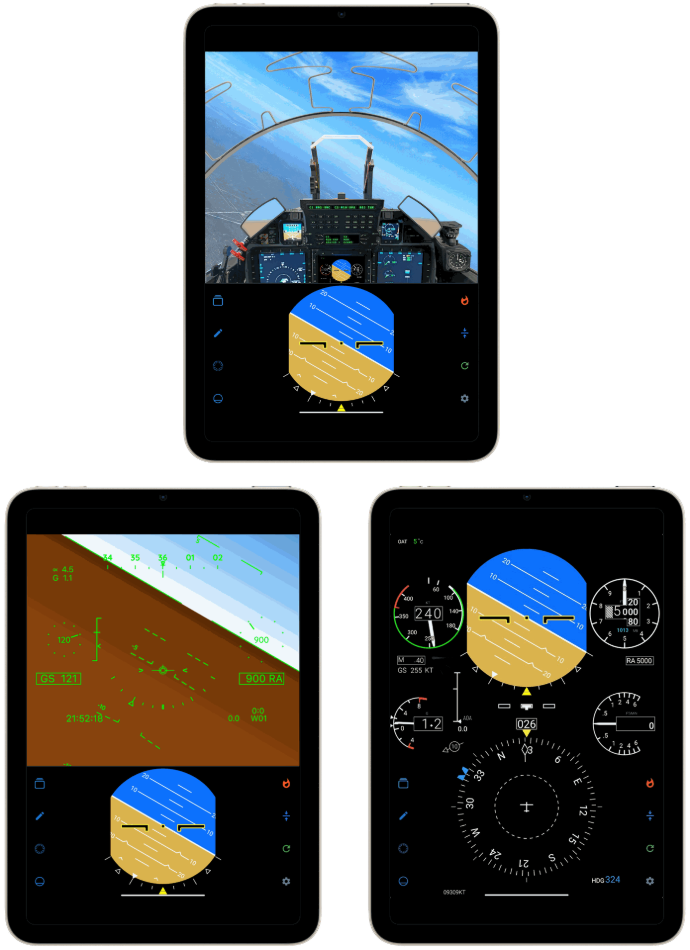
HUD Sim is an iPad-based training tool that presents a dynamic Heads-Up Display (HUD), Primary Flight Display (PFD), and visual flight attitudes across all phases of flight as defined in standard pilot-training syllabi.
Instructors and students can interact with the displays using touch controls or the iPad’s motion sensors to set specific attitudes, demonstrate manoeuvres, or highlight errors and corrections during briefing or revision.
Each training attitude is pre-loaded and easily selectable, allowing instructors to quickly display common flight conditions or instrument presentations without requiring simulator access.
Developed from firsthand experience within advanced pilot-training environments, HUD Sim is used in a Defence pilot-training program. Its framework can also be tailored for civil flight-training organisations or other contexts where instrument interpretation and visual-attitude awareness are key learning outcomes.
PURPOSE
HUD Sim is designed to help student pilots and instructors develop familiarity with key flight-display layouts and their relationship to aircraft attitude and performance.
By bridging the gap between classroom instruction and simulator time, it enables efficient demonstration, discussion, and reinforcement of display-interpretation skills.
Planned extensions include expanded instrument functionality—such as HSI and approach symbology—enhanced visual-attitude tools for runway alignment and formation concepts, and real-time instrument playbacks showing how flight displays respond during approaches such as ILS, TACAN, or GNSS procedures.
These developments will be pursued in line with training needs and available program support.
USE IN TRAINING
Currently used in a Defence pilot-training program, HUD Sim provides an accessible platform for:
- Demonstrating HUD, PFD, and attitude indications across all flight phases
- Supporting classroom and self-study familiarisation
- Reinforcing instrument interpretation and scan discipline
- Reviewing display changes associated with manoeuvres or procedural corrections
- Conducting guided discussions or knowledge checks in group settings
DEVELOPMENT CONTEXT
The display architecture is designed to be configurable, allowing adaptation to different aircraft types and training requirements with targeted development.
The application architecture is engineered for clarity, responsiveness, and reliable classroom use on standard iPad hardware.
Its modular design enables targeted additions, such as alternative symbology, expanded attitude sets, or aircraft-specific display layouts, when required for specific programs or syllabi.
HIGHLIGHTS
Capability at a glance
+ Dynamic displays
HUD, PFD, and visual-attitude displays covering all flight phases
+ Interactive control
Touch or motion-based control for real-time interaction
+ Pre-loaded attitudes
Quickly select common flying attitudes aligned with syllabus phases
+ Portable
Runs on standard iPad hardware for classroom, home or field use
+ Configurable
Configurable for alternative instrument sets or flight-display layouts
+ Built for training
Built for reliability, usability, and instructional clarity
ADAPTING THE CONCEPT
Adaptable by design
While the current version represents a specific aircraft display symbology, the HUD Sim framework can be adapted, with targeted development, to represent other aircraft systems or bespoke training outcomes.
It provides a proven base for tools where instrument interpretation and visual-attitude understanding are central to learning.
Ready to explore what’s possible?
Contact us to arrange a demonstration or discuss how our tools can fit within your training program
